New article
Recently updated
26.5 Performance Management release notes

Who is this article for?
Users who want to learn more about changes in version 26.5.
No special access or permissions are required.
Features
Find a KPI by name from a long list of KPIs
Existing system:
The View Data (Quick View) screen lists every configured KPI for the selected program, period and location, but there is no way to look up a KPI by name. Users must scroll through long metric lists to find what they need.
Purpose:
Let users find a KPI by name without scrolling.
Enhanced system:
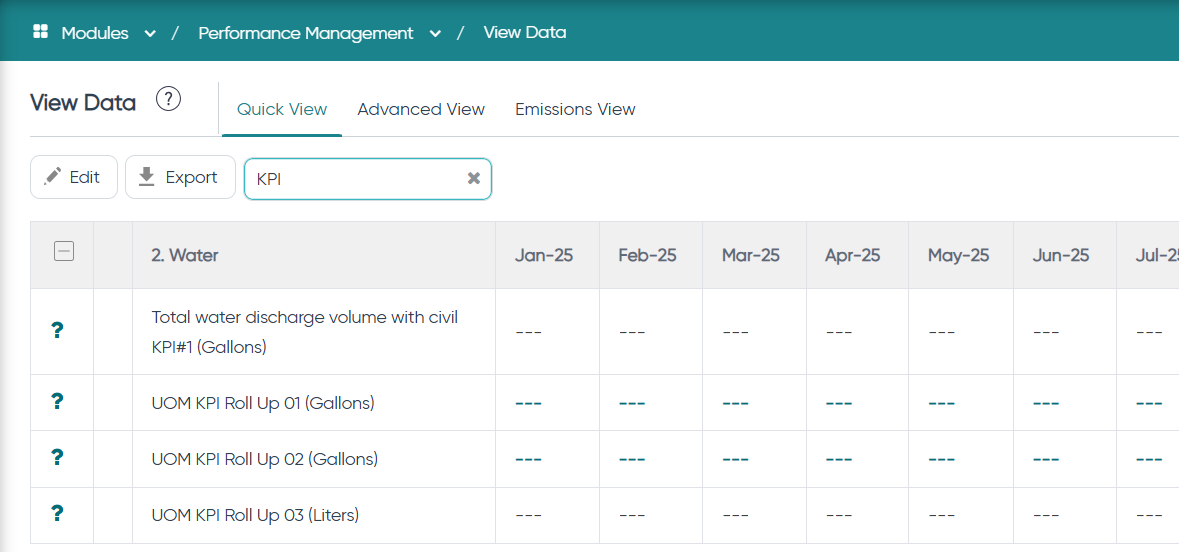
- A search box now appears in the header/toolbar of the Quick View screen. It is available to every user with access to the screen and is enabled for all customers, with no setting required.
- The search looks at KPI Name only and matches any part of the name, ignoring case. For example, searching "scope" returns "Scope 1 Emissions" and "Scope 2 Emissions". UOM, Conversion Factor, Corporate Value and period values are not searched.
- The grid filters as you type once at least three characters are entered. With fewer than three characters, the full list stays displayed. The clear (x) button restores the full list.
- Leading and trailing spaces are ignored, internal spaces are matched as typed, and special characters are treated as plain text.
- Parent groupings of matching KPIs stay visible for context. Data entry, save and other row actions work as usual, and sorting applies only to the matching rows.
- Export contains only the rows currently displayed.
- If nothing matches, the standard "no records found" message appears. The placeholder text is shown in the user's language.
- Other Sustainability screens (Detail View, Enter Data) are unchanged. This enhancement is Web only.